

QuestDB介绍
QuestDB 说明
本章,我们主要从QuestDB简介、QuestDB安装、Zookeeper配置、QuestDB配置、配置主题、用户权限、演示、动态增加用户和常用命令这几个方面对QuestDB进行介绍!
1、🍇QuestDB 简介
……
2、🍈QuestDB 安装
以下我们主要介绍 QuestDB 在 Windows 环境中的安装过程。
2.1、下载
官方地址:https://questdb.io
官方文档地址:https://questdb.io/docs
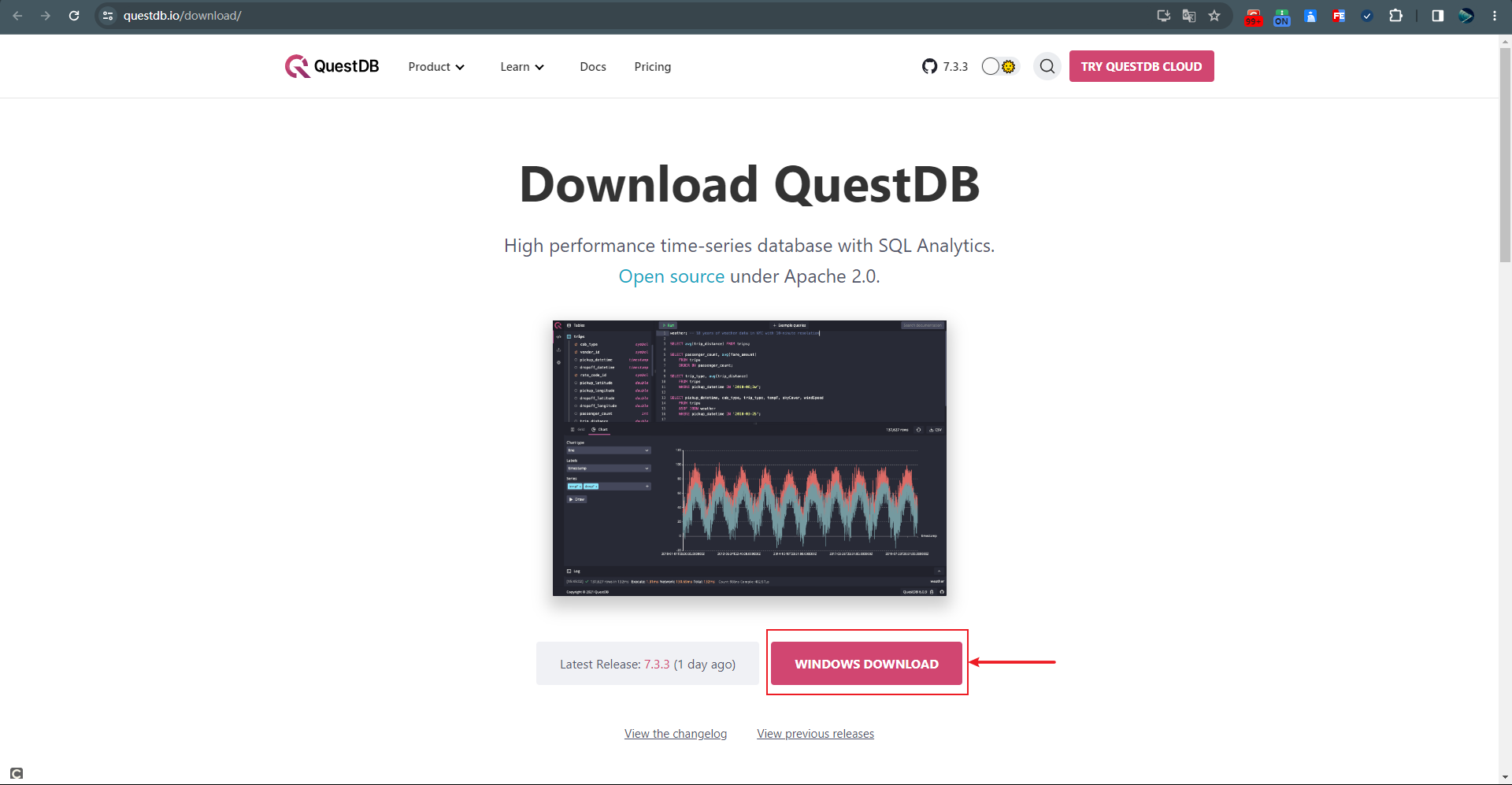
官方下载地址:https://questdb.io/download
如我们下载:https://github.com/questdb/questdb/releases/download/7.3.3/questdb-7.3.3-rt-windows-amd64.tar.gz
2.2、安装
解压
我们将下载下来的压缩文件
questdb-7.3.3-rt-windows-amd64.tar.gz解压到需要安装的目录,如:D:\Net_Program\Net_QuestDb,具体的解压文件如下图所示:
解压 安装服务(questdb.exe install 方式,不推荐)以管理员身份运行 CMD,并定位到 bin 目录,然后执行
questdb.exe install安装服务,安装成功后在服务中会多一个显示名称为QuestDB Server的服务。执行如下命令可以启动该服务:
questdb.exe start执行如下命令可以停止该服务:
questdb.exe stop注意
不推荐使用该方式创建 Windows 服务。
因为该方式在创建好服务后,首次启动会在系统盘
C:\Windows\System32下创建qdbroot文件夹,而qdbroot文件夹的作用就是存储数据、日志、配置以及 Web 控制台。因此,涉及到数据的存储,肯定不能保存在系统盘!!!
安装服务(手动安装,推荐)
这里我们采用
sc命令来手动安装服务。以管理员身份运行 CMD,然后执行如下命令来创建名称为
QuestDB的服务:sc create QuestDB binPath= "D:\Net_Program\Net_QuestDb\bin\questdb.exe service -d D:\Net_Program\Net_QuestDb\qdbroot -j D:\Net_Program\Net_QuestDb\bin\java.exe" start= auto displayname= "QuestDB Server"
安装服务 温馨提示
在上述命令中,
D:\Net_Program\Net_QuestDb\qdbroot需要注意,该参数的目的是:QuestDB 服务在首次启动的时候,会生成一个qdbroot根目录文件夹,在该文件夹下会自动创建conf、db、log和public文件夹,其中的db文件夹就是用来存放数据的,我们的数据存储总不能直接保存到系统盘中吧。所以我们在创建服务的时候一定要注意根据自己的需求自己配置该地址。
执行如下命令可以修改服务的描述信息:
sc description QuestDB "QuestDB服务,文档地址:https://questdb.io/docs/"
修改服务描述 执行如下命令来启动该服务(或者到 Windows 服务管理界面中去手动启动),在启动服务后,我们就会发现在
D:\Net_Program\Net_QuestDb下多了一个文件夹qdbrootnet start QuestDB
启动服务 注意
如果我们不手动设置
-d参数,那么 QuestDB 会在系统盘C:\Windows\System32下创建qdbroot文件夹,这样采用默认的存储路径强烈不推荐,原因如:数据存储在系统盘不安全等。
3、🍉 运行
在上述服务安装并启动成功后,我们可在浏览器中输入http://localhost:9000进行 Web 控制台的访问。

4、🍊 配置
在服务启动成功后,会在D:\Net_Program\Net_QuestDb中创建qdbroot文件夹,在该文件夹下分别有conf、db、log和public文件夹。
qdbroot 文件夹

conf
该文件夹中包含了日志、服务以及 mime 等配置文件。
db
该文件夹用于存储具体数据。
log
该文件夹用于存储日志文件。
public
该文件夹为 Web 控制台的静态文件。
其中在conf文件夹中的server.conf文件就是服务的配置文件。如我们可以设置 Web 控制台的端口号(http.net.bind.to:可以设置 IP 和端口号,默认为 9000 端口)。
更多配置请参考官网说明:https://questdb.io/docs/reference/configuration
默认的全部配置
# Comment or set to false to allow QuestDB to start even in the presence of config errors.
config.validation.strict=true

# number of worker threads shared across the application. Increasing this number will increase parallelism in the application at the expense of CPU resources
#shared.worker.count=2

# comma-delimited list of CPU ids, one per thread specified in "shared.worker.count". By default, threads have no CPU affinity
#shared.worker.affinity=

# toggle whether worker should stop on error
#shared.worker.haltOnError=false

# Repeats compatible migrations from the specified version. The default setting of 426 allows to upgrade and downgrade QuestDB in the range of versions from 6.2.0 to 7.0.2.
# If set to -1 start time improves but downgrades to versions below 7.0.2 and subsequent upgrades can lead to data corruption and crashes.
#cairo.repeat.migration.from.version=426

################ HTTP settings ##################

# enable HTTP server
#http.enabled=true

# IP address and port of HTTP server
#http.net.bind.to=0.0.0.0:9000

#http.net.connection.limit=64
# Windows OS might have a limit on TCP backlog size. Typically Windows 10 has max of 200. This
# means that even if net.connection.limit is set over 200 it wont be possible to have this many
# concurrent connections. To overcome this limitation Windows has an unreliable hack, which you can
# exercise with this flag. Do only set it if you actively try to overcome limit you have already
# experienced. Read more about SOMAXCONN_HINT here https://docs.microsoft.com/en-us/windows/win32/api/winsock2/nf-winsock2-listen
#http.net.connection.hint=false

# Idle HTTP connection timeout in milliseconds.
#http.net.connection.timeout=300000

#Amount of time in milliseconds a connection can wait in the listen backlog queue before its refused. Connections will be aggressively removed from the backlog until the active connection limit is breached
#http.net.connection.queue.timeout=5000

# SO_SNDBUF value, -1 = OS default
#http.net.connection.sndbuf=2m

# SO_RCVBUF value, -1 = OS default
#http.net.connection.rcvbuf=2m

# size of receive buffer on application side
#http.receive.buffer.size=1m

# initial size of the connection pool
#http.connection.pool.initial.capacity=4

# initial size of the string pool shared by HttpHeaderParser and HttpMultipartContentParser
#http.connection.string.pool.capacity=128

# HeaderParser buffer size in bytes
#http.multipart.header.buffer.size=512

# how long code accumulates incoming data chunks for column and delimiter analysis
#http.multipart.idle.spin.count=10000

#http.request.header.buffer.size=64k

#http.worker.count=0
#http.worker.affinity=
#http.worker.haltOnError=false

# size of send data buffer
#http.send.buffer.size=2m

# name of index file
#http.static.index.file.name=index.html

# sets the clock to always return zero
#http.frozen.clock=false

#http.allow.deflate.before.send=false

## When you using SSH tunnel you might want to configure
## QuestDB HTTP server to switch to HTTP/1.0

## Set HTTP protocol version to HTTP/1.0
#http.version=HTTP/1.1
## Set server keep alive to 'false'. This will make server disconnect client after
## completion of each request
#http.server.keep.alive=true

## When in HTTP/1.0 mode keep alive values must be 0
#http.keep-alive.timeout=5
#http.keep-alive.max=10000

#http.static.public.directory=public

#http.text.date.adapter.pool.capacity=16
#http.text.json.cache.limit=16384
#http.text.json.cache.size=8192
#http.text.max.required.delimiter.stddev=0.1222d
#http.text.max.required.line.length.stddev=0.8
#http.text.metadata.string.pool.capacity=128
#http.text.roll.buffer.limit=8216576
#http.text.roll.buffer.size=1024
#http.text.analysis.max.lines=1000
#http.text.lexer.string.pool.capacity=64
#http.text.timestamp.adapter.pool.capacity=64
#http.text.utf8.sink.size=4096

#http.json.query.connection.check.frequency=1000000
#http.json.query.float.scale=4
#http.json.query.double.scale=12

# enables the query cache
#http.query.cache.enabled=true

# sets the number of blocks for the query cache. Cache capacity is number_of_blocks * number_of_rows
#http.query.cache.block.count=4

# sets the number of rows for the query cache. Cache capacity is number_of_blocks * number_of_rows
#http.query.cache.row.count=4

#http.security.readonly=false
#http.security.max.response.rows=Long.MAX_VALUE

# circuit breaker is a mechanism that interrupts query execution
# at present queries are interrupted when remote client disconnects or when execution takes too long
# and times out

# circuit breaker is designed to be invoke continuously in a tight loop
# the throttle is a number of pin cycles before abort conditions are tested
#circuit.breaker.throttle=2000000

# buffer used by I/O dispatchers and circuit breakers to check the socket state, please do not change this value
# the check reads \r\n from the input stream and discards it since some HTTP clients send this as a keep alive in between requests
#net.test.connection.buffer.size=64

# max execution time for read-only query in seconds, this can be a floating point value to specify 0.5s
# "insert" type of queries are not aborted unless they
# it is "insert as select", where select takes long time before producing rows for the insert
query.timeout.sec=60

## HTTP MIN settings
##
## Use this port to health check QuestDB instance when it isn't desired to log these health check requests. This is sort of /dev/null for monitoring

#http.min.enabled=true
#http.min.net.bind.to=0.0.0.0:9003

# When enabled, health check will return HTTP 500 if there were any unhandled errors since QuestDB instance start.
#http.pessimistic.health.check.enabled=false

################ Cairo settings ##################

# directory for storing db tables and metadata. this directory is inside the server root directory provided at startup
#cairo.root=db

# how changes to table are flushed to disk upon commit - default: nosync. Choices: nosync, async (flush call schedules update, returns immediately), sync (waits for flush to complete)
#cairo.commit.mode=nosync

# number of types table creation or insertion will be attempted
#cairo.create.as.select.retry.count=5

# comma separated list of volume definitions, volume_alias -> absolute_path_to_existing_directory.
# volume alias can then be used in create table statement with IN VOLUME clause
#cairo.volumes=  by default IN VOLUME is switched off, no volume definitions.

# type of map uses. Options: 1. fast (speed at the expense of storage. this is the default option) 2. compact
#cairo.default.map.type=fast

# when true, symbol values will be cached on Java heap
#cairo.default.symbol.cache.flag=false

# when column type is SYMBOL this parameter specifies approximate capacity for symbol map.
# It should be equal to number of unique symbol values stored in the table and getting this
# value badly wrong will cause performance degradation. Must be power of 2
#cairo.default.symbol.capacity=256

# number of attempts to open files
#cairo.file.operation.retry.count=30

# how often the writer maintenance job gets run, in milliseconds
#cairo.idle.check.interval=300000

# defines the number of latest partitions to keep open when returning a reader to the reader pool
#cairo.inactive.reader.max.open.partitions=128

# defines frequency in milliseconds with which the reader pool checks for inactive readers.
#cairo.inactive.reader.ttl=120000

# defines frequency in milliseconds with which the writer pool checks for inactive readers.
#cairo.inactive.writer.ttl=600000

# approximation of number of rows for single index key, must be power of 2
#cairo.index.value.block.size=256

# number of attempts to open swap file
#cairo.max.swap.file.count=30

# file permission for new directories
#cairo.mkdir.mode=509

# maximum file name length in chars. Affects maximum table name length and maximum column name length
#cairo.max.file.name.length=127

# minimum number of rows before allowing use of parallel indexation
#cairo.parallel.index.threshold=100000

# number of attempts to get TableReader
#cairo.reader.pool.max.segments=5

# timeout in milliseconds when attempting to get atomic memory snapshots, e.g. in BitmapIndexReaders
#cairo.spin.lock.timeout=1000

# sets size of the CharacterStore
#cairo.character.store.capacity=1024

# Sets size of the CharacterSequence pool
#cairo.character.store.sequence.pool.capacity=64

# sets size of the Column pool in the SqlCompiler
#cairo.column.pool.capacity=4096

# load factor for CompactMaps
#cairo.compact.map.load.factor=0.7

# size of the ExpressionNode pool in SqlCompiler
#cairo.expression.pool.capacity=8192

# load factor for all FastMaps
#cairo.fast.map.load.factor=0.7

# size of the JoinContext pool in SqlCompiler
#cairo.sql.join.context.pool.capacity=64

# size of FloatingSequence pool in GenericLexer
#cairo.lexer.pool.capacity=2048

# sets the key capacity in FastMap and CompactMap
#cairo.sql.map.key.capacity=2097152

# sets the key capacity in FastMap and CompactMap used in certain queries, e.g. SAMPLE BY
#cairo.sql.small.map.key.capacity=1024

# number of map resizes in FastMap and CompactMap before a resource limit exception is thrown, each resize doubles the previous size
#cairo.sql.map.max.resizes=2^31

# memory page size for FastMap and CompactMap
#cairo.sql.map.page.size=4m

# memory page size in FastMap and CompactMap used in certain queries, e.g. SAMPLE BY
#cairo.sql.small.map.page.size=32k

# memory max pages for CompactMap
#cairo.sql.map.max.pages=2^31

# sets the size of the QueryModel pool in the SqlCompiler
#cairo.model.pool.capacity=1024

# sets the maximum allowed negative value used in LIMIT clause in queries with filters
#cairo.sql.max.negative.limit=10000

# sets the memory page size for storing keys in LongTreeChain
#cairo.sql.sort.key.page.size=4m

# max number of pages for storing keys in LongTreeChain before a resource limit exception is thrown
# cairo.sql.sort.key.max.pages=2^31

# sets the memory page size and max pages for storing values in LongTreeChain
#cairo.sql.sort.light.value.page.size=1048576
#cairo.sql.sort.light.value.max.pages=2^31

# sets the memory page size and max pages of the slave chain in full hash joins
#cairo.sql.hash.join.value.page.size=16777216
#cairo.sql.hash.join.value.max.pages=2^31

# sets the initial capacity for row id list used for latest by
#cairo.sql.latest.by.row.count=1000

# sets the memory page size and max pages of the slave chain in light hash joins
#cairo.sql.hash.join.light.value.page.size=1048576
#cairo.sql.hash.join.light.value.max.pages=2^31

# sets memory page size and max pages of file storing values in SortedRecordCursorFactory
#cairo.sql.sort.value.page.size=16777216
#cairo.sql.sort.value.max.pages=2^31

# latch await timeout in nanoseconds for stealing indexing work from other threads
#cairo.work.steal.timeout.nanos=10000

# whether parallel indexation is allowed. Works in conjunction with cairo.parallel.index.threshold
#cairo.parallel.indexing.enabled=true

# memory page size for JoinMetadata file
#cairo.sql.join.metadata.page.size=16384

# number of map resizes in JoinMetadata before a resource limit exception is thrown, each resize doubles the previous size
#cairo.sql.join.metadata.max.resizes=2^31

# size of  AnalyticColumn pool in SqlParser
#cairo.sql.analytic.column.pool.capacity=64

# sets the memory page size and max number of pages for records in analytic function
#cairo.sql.analytic.store.page.size=1m
#cairo.sql.analytic.store.max.pages=2^31

# sets the memory page size and max number of pages for row ids in analytic function
#cairo.sql.analytic.rowid.page.size=512k
#cairo.sql.analytic.rowid.max.pages=2^31

# sets the memory page size and max number of pages for keys in analytic function
#cairo.sql.analytic.tree.page.size=512k
#cairo.sql.analytic.tree.max.pages=2^31

# size of  CreateTableModel pool in SqlParser
#cairo.sql.create.table.model.pool.capacity=16

# size of  ColumnCastModel pool in SqlParser
#cairo.sql.column.cast.model.pool.capacity=16

# size of  RenameTableModel pool in SqlParser
#cairo.sql.rename.table.model.pool.capacity=16

# size of  WithClauseModel pool in SqlParser
#cairo.sql.with.clause.model.pool.capacity=128

# size of  InsertModel pool in SqlParser
#cairo.sql.insert.model.pool.capacity=64

####  SQL COPY

# size of  CopyModel pool in SqlParser
#cairo.sql.copy.model.pool.capacity=32

# size of buffer used when copying tables
#cairo.sql.copy.buffer.size=2m

# name of file with user's set of date and timestamp formats
#cairo.sql.copy.formats.file=/text_loader.json

# input root directory, where copy command reads files from
#cairo.sql.copy.root=null

# input work directory, where temporary import files are created, by default it's located in tmp directory inside the server root directory
#cairo.sql.copy.work.root=null

# default max size of intermediate import file index chunk (100MB). Import shouldn't use more memory than worker_count * this .
#cairo.sql.copy.max.index.chunk.size=100M

# Capacity of the internal queue used to split parallel copy SQL command into subtasks and execute them across shared worker threads.
# The default configuration should be suitable for importing files of any size.
#cairo.sql.copy.queue.capacity=32

# Number of days to retain records in import log table (sys.parallel_text_import_log). Old records get deleted on each import and server restart.
#cairo.sql.copy.log.retention.days=3

#cairo.sql.double.cast.scale=12
#cairo.sql.float.cast.scale=4

# output root directory for backups
#cairo.sql.backup.root=null
# 指定数据备份地址
cairo.sql.backup.root=D:/Net_Program/Net_QuestDb/backup

# date format for backup directory
#cairo.sql.backup.dir.datetime.format=yyyy-MM-dd

# name of temp directory used during backup
#cairo.sql.backup.dir.tmp.name=tmp

# permission used when creating backup directories
#cairo.sql.backup.mkdir.mode=509

# suffix of the partition directory in detached root to indicate it is ready to be attached
#cairo.attach.partition.suffix=.attachable

# Use file system "copy" operation instead of "hard link" when attaching partition from detached root. Set to ture if detached root is on a different drive.
#cairo.attach.partition.copy=false

# file permission used when creating detached directories
#cairo.detached.mkdir.mode=509

# sample by index query page size - max values returned in single scan
# 0 means to use symbol block capacity
# cairo.sql.sampleby.page.size=0

# sets the minimum number of rows in page frames used in SQL queries
#cairo.sql.page.frame.min.rows=1000

# sets the maximum number of rows in page frames used in SQL queries
#cairo.sql.page.frame.max.rows=1000000

# sets the memory page size and max number of pages for memory used by rnd functions
# currently rnd_str() and rnd_symbol(), this could extend to other rnd functions in the future
#cairo.rnd.memory.page.size=8K
#cairo.rnd.memory.max.pages=128

# max length (in chars) of buffer used to store result of SQL functions, such as replace() or lpad()
#cairo.sql.string.function.buffer.max.size=1048576

# SQL JIT compiler mode. Options:
# 1. on (enable JIT and use vector instructions when possible; default value)
# 2. scalar (enable JIT and use scalar instructions only)
# 3. off (disable JIT)
#cairo.sql.jit.mode=on

# sets the memory page size and max pages for storing IR for JIT compilation
#cairo.sql.jit.ir.memory.page.size=8K
#cairo.sql.jit.ir.memory.max.pages=8

# sets the memory page size and max pages for storing bind variable values for JIT compiled filter
#cairo.sql.jit.bind.vars.memory.page.size=4K
#cairo.sql.jit.bind.vars.memory.max.pages=8

# sets minimum number of rows to shrink filtered rows memory after query execution
#cairo.sql.jit.rows.threshold=1M

# sets minimum cache size to shrink page address cache after query execution
#cairo.sql.jit.page.address.cache.threshold=1M

# sets debug flag for JIT compilation; when enabled, assembly will be printed into stdout
#cairo.sql.jit.debug.enabled=false

#cairo.date.locale=en

# Maximum number of uncommitted rows in TCP ILP
#cairo.max.uncommitted.rows=500000

# Minimum size of in-memory buffer in milliseconds. The buffer is allocated dynamically through analysing
# the shape of the incoming data, and o3MinLag is the lower limit
#cairo.o3.min.lag=1000

# Maximum size of in-memory buffer in milliseconds. The buffer is allocated dynamically through analysing
# the shape of the incoming data, and o3MaxLag is the upper limit
#cairo.o3.max.lag=600000

# Memory page size per column for O3 operations. Please be aware O3 will use 2x of this RAM per column
#cairo.o3.column.memory.size=8M

# Number of partition expected on average, initial value for purge allocation job, extended in runtime automatically
#cairo.o3.partition.purge.list.initial.capacity=1

# mmap sliding page size that TableWriter uses to append data for each column
#cairo.writer.data.append.page.size=16M

# mmap page size for mapping small files, such as _txn, _todo and _meta
# the default value is OS page size (4k Linux, 64K windows, 16k OSX M1)
# if you override this value it will be rounded to the nearest (greater) multiple of OS page size
#cairo.writer.misc.append.page.size=4k

# mmap page size for appending index key data; key data is number of distinct symbol values times 4 bytes
#cairo.writer.data.index.key.append.page.size=512k

# mmap page size for appending value data; value data are rowids, e.g. number of rows in partition times 8 bytes
#cairo.writer.data.index.value.append.page.size=16M

# Maximum wait timeout in milliseconds for ALTER TABLE SQL statement run via REST and PG Wire interfaces when statement execution is ASYNCHRONOUS
#cairo.writer.alter.busy.wait.timeout=500

# Row count to check writer command queue after on busy writing (e.g. tick after X rows written)
#cairo.writer.tick.rows.count=1024

# Maximum writer ALTER TABLE and replication command capacity. Shared between all the tables
#cairo.writer.command.queue.capacity=32

# Maximum flush query cache command queue capacity
#cairo.query.cache.event.queue.capacity=4

# Sets flag to enable io_uring interface for certain disk I/O operations on newer Linux kernels (5.12+).
#cairo.iouring.enabled=true

# Minimum O3 partition prefix size for which O3 partition split happens to avoid copying the large prefix
#cairo.o3.partition.split.min.size=50M

# The number of O3 partition splits allowed for the last partitions. If the number of splits grows above this value, the splits will be squashed
#cairo.o3.last.partition.max.splits=20

################ Parallel SQL execution ################

# Sets flag to enable parallel SQL filter execution. JIT compilation takes place only when this setting is enabled.
#cairo.sql.parallel.filter.enabled=true

# Sets flag to enable column pre-touch as a part of the parallel SQL filter execution. This setting improves query performance in case of large tables.
#cairo.sql.parallel.filter.pretouch.enabled=true

# Shard reduce queue contention between SQL statements that are executed concurrently.
#cairo.page.frame.shard.count=4

# Reduce queue is used for data processing and should be large enough to supply tasks for worker threads (shared worked pool).
#cairo.page.frame.reduce.queue.capacity=64

# Initial row ID list capacity for each slot of the "reduce" queue. Larger values reduce memory allocation rate, but increase RSS size.
#cairo.page.frame.rowid.list.capacity=256

# Initial column list capacity for each slot of the "reduce" queue. Used by JIT-compiled filters.
#cairo.page.frame.column.list.capacity=16

# Initial object pool capacity for local "reduce" tasks. These tasks are used to avoid blocking query execution when the "reduce" queue is full.
#cairo.page.frame.task.pool.capacity=4

################ LINE settings ######################
#line.default.partition.by=DAY

# Enable / Disable  automatic creation of new columns in existing tables via ILP. When set to false overrides value of line.auto.create.new.tables to false
#line.auto.create.new.columns=true

# Enable / Disable automatic creation of new tables via ILP.
#line.auto.create.new.tables=true

################ LINE UDP settings ##################

#line.udp.bind.to=0.0.0.0:9009
#line.udp.join=232.1.2.3
#line.udp.commit.rate=1000000
#line.udp.msg.buffer.size=2048
#line.udp.msg.count=10000
#line.udp.receive.buffer.size=8m
#line.udp.enabled=true
#line.udp.own.thread.affinity=-1
#line.udp.own.thread=false
#line.udp.unicast=false
#line.udp.commit.mode=nosync
#line.udp.timestamp=n

######################### LINE TCP settings ###############################
#line.tcp.enabled=true
#line.tcp.net.bind.to=0.0.0.0:9009
#line.tcp.net.connection.limit=256

# Windows OS might have a limit on TCP backlog size. Typically Windows 10 has max of 200. This
# means that even if net.connection.limit is set over 200 it wont be possible to have this many
# concurrent connections. To overcome this limitation Windows has an unreliable hack, which you can
# exercise with this flag. Do only set it if you actively try to overcome limit you have already
# experienced. Read more about SOMAXCONN_HINT here https://docs.microsoft.com/en-us/windows/win32/api/winsock2/nf-winsock2-listen
#line.tcp.net.connection.hint=false

# Idle TCP connection timeout in milliseconds. 0 means there is no timeout.
#line.tcp.net.connection.timeout=0

# Amount of time in milliseconds a connection can wait in the listen backlog queue before its refused. Connections will be aggressively removed from the backlog until the active connection limit is breached
#line.tcp.net.connection.queue.timeout=5000

# SO_RCVBUF value, -1 = OS default
#line.tcp.net.connection.rcvbuf=-1

#line.tcp.connection.pool.capacity=64
#line.tcp.timestamp=n

# TCP message buffer size
#line.tcp.msg.buffer.size=2048

# Max measurement size
#line.tcp.max.measurement.size=2048

# Size of the queue between the IO jobs and the writer jobs, each queue entry represents a measurement
#line.tcp.writer.queue.capacity=128

# IO and writer job worker pool settings, 0 indicates the shared pool should be used
#line.tcp.writer.worker.count=0
#line.tcp.writer.worker.affinity=
#line.tcp.writer.worker.yield.threshold=10
#line.tcp.writer.worker.sleep.threshold=1000
#line.tcp.writer.halt.on.error=false

#line.tcp.io.worker.count=0
#line.tcp.io.worker.affinity=
#line.tcp.io.worker.yield.threshold=10
#line.tcp.io.worker.sleep.threshold=1000
#line.tcp.io.halt.on.error=false

# Sets flag to disconnect TCP connection that sends malformed messages.
#line.tcp.disconnect.on.error=true

# Commit lag fraction. Used to calculate commit interval for the table according to the following formula:
# commit_interval = commit_lag ∗ fraction
# The calculated commit interval defines how long uncommitted data will need to remain uncommitted.
#line.tcp.commit.interval.fraction=0.5
# Default commit interval in milliseconds. Used when o3MinLag is set to 0.
#line.tcp.commit.interval.default=2000

# Maximum amount of time in between maintenance jobs in milliseconds, these will commit uncommitted data
#line.tcp.maintenance.job.interval=1000
# Minimum amount of idle time before a table writer is released in milliseconds
#line.tcp.min.idle.ms.before.writer.release=500

################ PG Wire settings ##################

#pg.enabled=true
#pg.net.bind.to=0.0.0.0:8812
#pg.net.connection.limit=64
# Windows OS might have a limit on TCP backlog size. Typically Windows 10 has max of 200. This
# means that even if active.connection.limit is set over 200 it wont be possible to have this many
# concurrent connections. To overcome this limitation Windows has an unreliable hack, which you can
# exercise with this flag. Do only set it if you actively try to overcome limit you have already
# experienced. Read more about SOMAXCONN_HINT here https://docs.microsoft.com/en-us/windows/win32/api/winsock2/nf-winsock2-listen
#pg.net.connection.hint=false

# Connection idle timeout in milliseconds. Connections are closed by the server when this timeout lapses.
#pg.net.connection.timeout=300000

# Amount of time in milliseconds a connection can wait in the listen backlog queue before its refused. Connections will be aggressively removed from the backlog until the active connection limit is breached.
#pg.net.connection.queue.timeout=300000

# SO_RCVBUF value, -1 = OS default
#pg.net.connection.rcvbuf=-1

# SO_SNDBUF value, -1 = OS default
#pg.net.connection.sndbuf=-1

#pg.character.store.capacity=4096
#pg.character.store.pool.capacity=64
#pg.connection.pool.capacity=64
#pg.password=quest
#pg.user=admin
# Enables read-only mode for the pg wire protocol. In this mode data mutation queries are rejected.
#pg.security.readonly=false
#pg.readonly.password=quest
#pg.readonly.user=user
# Enables separate read-only user for the pg wire server. Data mutation queries are rejected for all connections opened by this user.
#pg.readonly.user.enabled=false
# enables select query cache
#pg.select.cache.enabled=true
# sets the number of blocks for the select query cache. Cache capacity is number_of_blocks * number_of_rows
#pg.select.cache.block.count=4
# sets the number of rows for the select query cache. Cache capacity is number_of_blocks * number_of_rows
#pg.select.cache.row.count=4
# enables insert query cache
#pg.insert.cache.enabled=true
# sets the number of blocks for the insert query cache. Cache capacity is number_of_blocks * number_of_rows
#pg.insert.cache.block.count=4
# sets the number of rows for the insert query cache. Cache capacity is number_of_blocks * number_of_rows
#pg.insert.cache.row.count=4
#pg.max.blob.size.on.query=512k
#pg.recv.buffer.size=1M
#pg.send.buffer.size=1M
#pg.date.locale=en
#pg.worker.count=2
#pg.worker.affinity=-1,-1;
#pg.halt.on.error=false
#pg.daemon.pool=true
#pg.binary.param.count.capacity=2

################ WAL settings ##################

# Enable support of creating and writing to WAL tables
#cairo.wal.supported=true

# If set to true WAL becomes the default mode for newly created tables. Impacts table created from ILP and SQL if WAL / BYPASS WAL not specified
cairo.wal.enabled.default=true

# Parallel threads to apply WAL data to the table storage. By default it is equal to the CPU core count.
# When set to 0 WAL apply job will run as a single instance on shared worker pool.
#wal.apply.worker.count=

# WAL apply pool configuration
#wal.apply.worker.affinity=
#wal.apply.worker.yield.threshold=10
#wal.apply.worker.sleep.threshold=10000
#wal.apply.worker.haltOnError=false

# Period in ms of how often WAL applied files are cleaned up from the disk
#cairo.wal.purge.interval=30000

# Row count of how many rows are written to the same WAL segment before starting a new segment.
#cairo.wal.segment.rollover.row.count=200000

# mmap sliding page size that WalWriter uses to append data for each column
#cairo.wal.writer.data.append.page.size=1M

# Multiplier to cairo.max.uncommitted.rows to calculate the limit of rows that can kept invisible when writing
# to WAL table under heavy load, when multiple transactions are to be applied.
# It is used to reduce the number Out Of Order commits when Out Of Order commits are unavoidable by squashing multiple commits together.
# Setting it very low can increase Out Of Order commit frequency and decrease the throughput.
# Setting it too high may cause excessive memory usage and increase the latency.
#cairo.wal.squash.uncommitted.rows.multiplier=20.0

# Maximum number of transactions to keep in O3 lag for WAL tables. Once the number is reached, full commit occurs.
# If not set, defaults to the rounded value of cairo.wal.squash.uncommitted.rows.multiplier.
#cairo.wal.max.lag.txn.count=20

# When WAL apply job processes transactions this is the minimum number of transaction
# to look ahead and read metadata of before applying any of them.
#cairo.wal.apply.look.ahead.txn.count=20

################ Telemetry settings ##################

# Telemetry switch. Telemetry events are used to identify components of questdb that are being used. They never identify
# user nor data stored in questdb. All events can be viewed via `select * from telemetry`. Switching telemetry off will
# stop all events from being collected and subsequent growth of `telemetry` table. After telemetry is switched off
# `telemetry` table can be dropped.
#telemetry.enabled=true

# Capacity of the internal telemetry queue, which is the gateway of all telemetry events.
# This queue capacity does not require tweaking.
#telemetry.queue.capacity=512

# Hides telemetry tables from `select * from tables()` output. As a result, telemetry tables
# will not be visible in the Web Console table view
#telemetry.hide.tables=true

################ Metrics settings ##################

#metrics.enabled=true
5、🍍 测试
此时,我们在 Web 控制台中进行数据的测试。
以下测试我们通过官方的示例进行演示,具体可参见官方示例:https://questdb.io/docs/get-started/first-database
5.1、创建表 sensors
执行如下 SQL 来创建表 sensors:
CREATE TABLE sensors (ID LONG, make STRING, city STRING);
创建表sensors 执行如下 SQL 向表 sensors 中添加 10000 条数据:
INSERT INTO sensors
    SELECT
        x ID, --increasing integer
        rnd_str('Eberle', 'Honeywell', 'Omron', 'United Automation', 'RS Pro') make,
        rnd_str('北京', '上海', '深圳', '广州', '浙江', '四川') city
    FROM long_sequence(10000) x;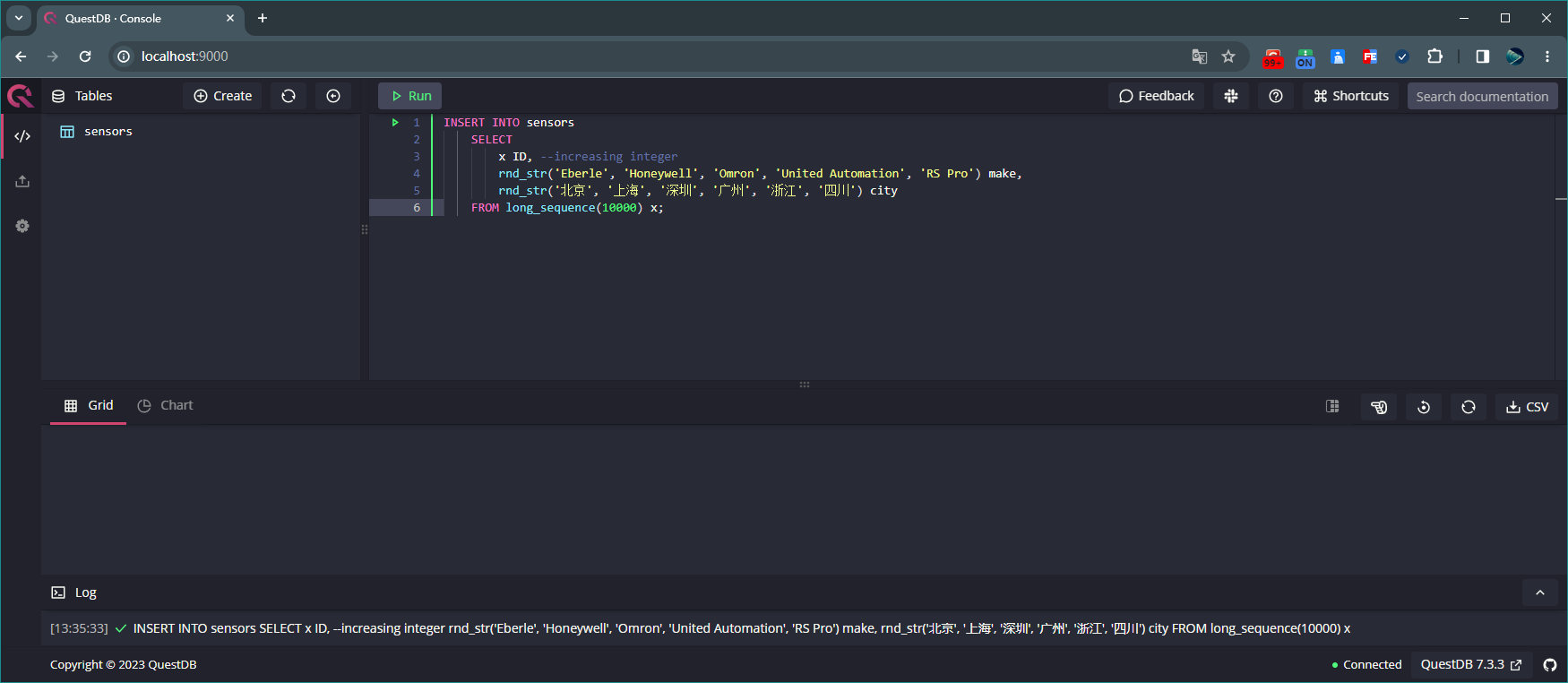
向表sensors中添加10000条数据 执行如下 SQL 可查看表 sensors 的所有数据:
-- 查看表sensors所有数据

-- 方式1:
'sensors';

-- 方式2:
SELECT * FROM sensors;
查看表sensors所有数据
5.2、创建表 readings
执行如下 SQL 来创建表 readings,并向该表添加 100000000 条数据:
CREATE TABLE readings
AS(
    SELECT
        x ID,
        timestamp_sequence(to_timestamp('2019-10-17T00:00:00', 'yyyy-MM-ddTHH:mm:ss'), rnd_long(1,10,0) * 100000L) ts,
        rnd_double(0)*8 + 15 temp,
        rnd_long(0, 10000, 0) sensorId
    FROM long_sequence(100000000) x)
TIMESTAMP(ts)
PARTITION BY MONTH;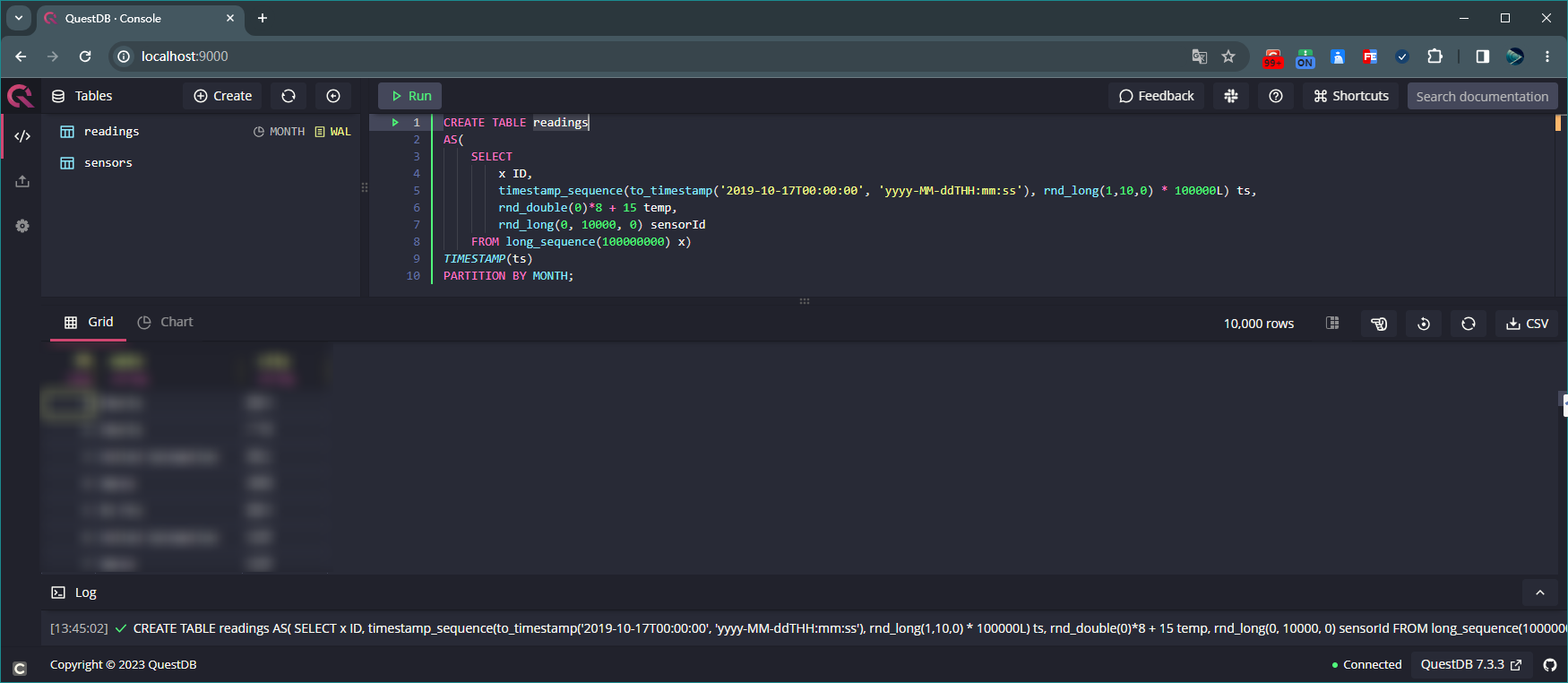
创建表readings,并向该表添加100000000条数据 执行如下命令查询表 readings 前 2000 条数据:
SELECT * FROM readings LIMIT 0,2000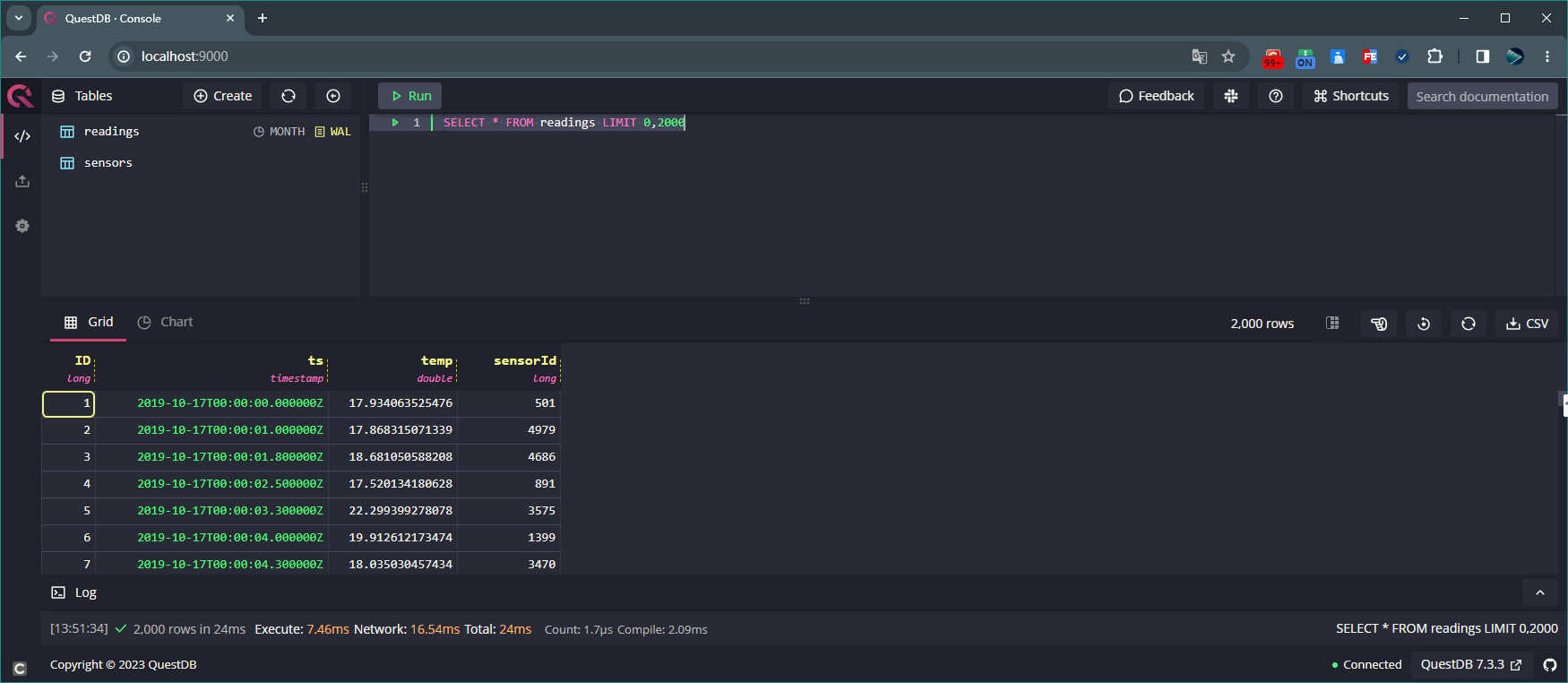
查询表readings前2000条数据
5.3、查询
执行如下命令查询表 readings 数据总条数:
SELECT count() TotalCount FROM readings;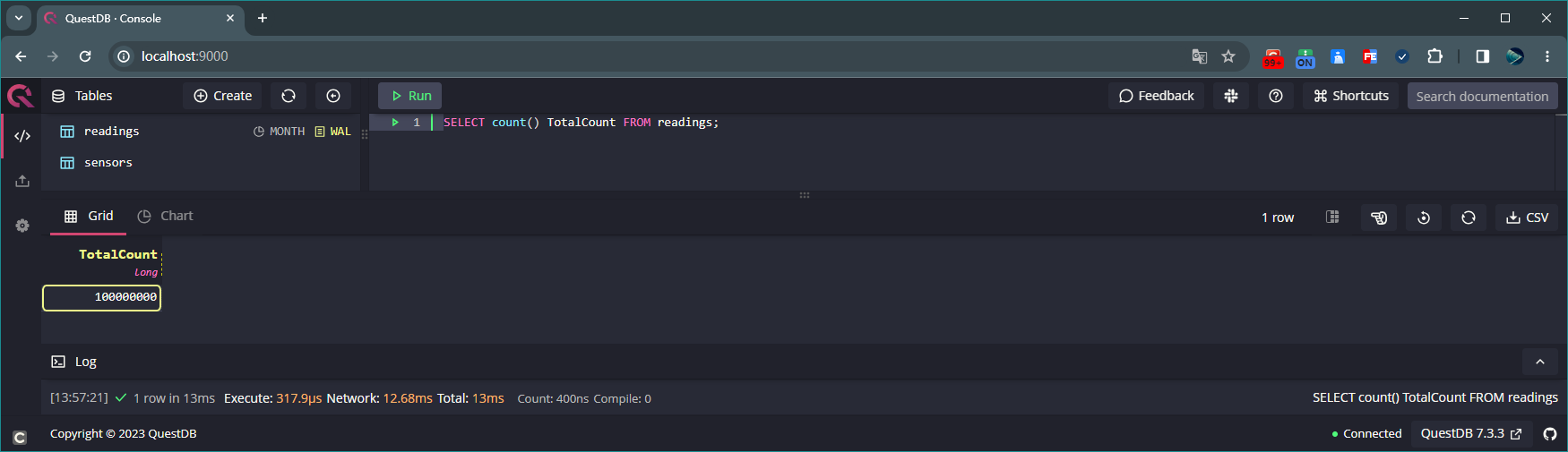
查询表readings数据总条数 执行如下命令统计表 readings 中字段 temp 的平均值:
SELECT avg(temp) TempAge FROM readings;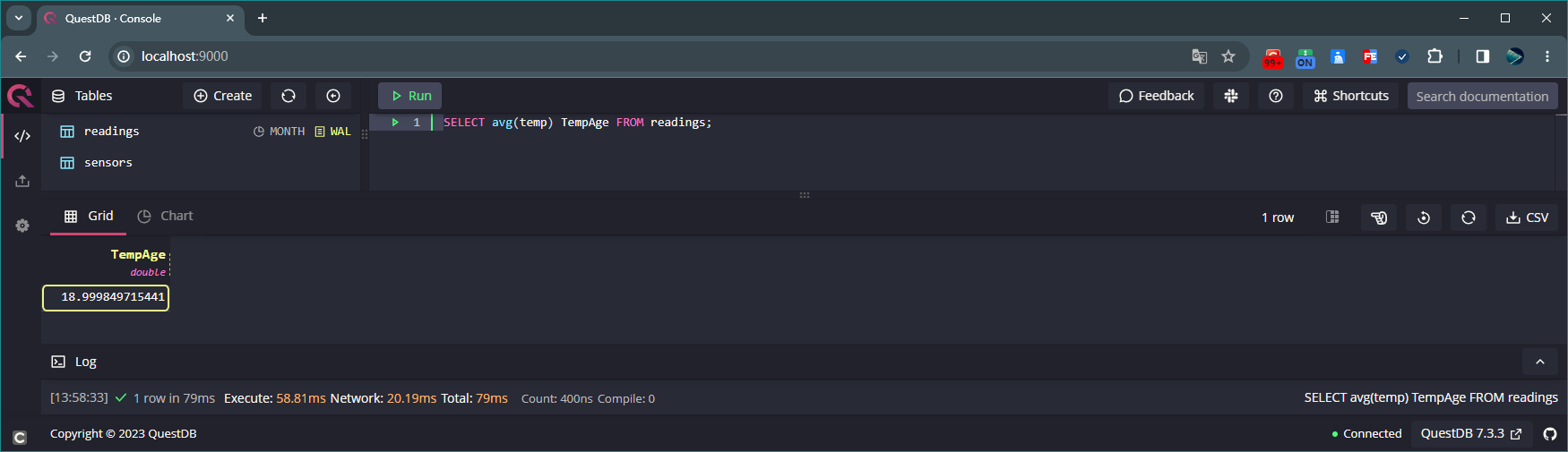
统计表readings中字段temp的平均值 执行如下命令联合查询表 sensors 和 readings 的所有数据:
SELECT *
FROM readings
JOIN(
    SELECT ID sensId, make, city
    FROM sensors)
ON readings.sensorId = sensId;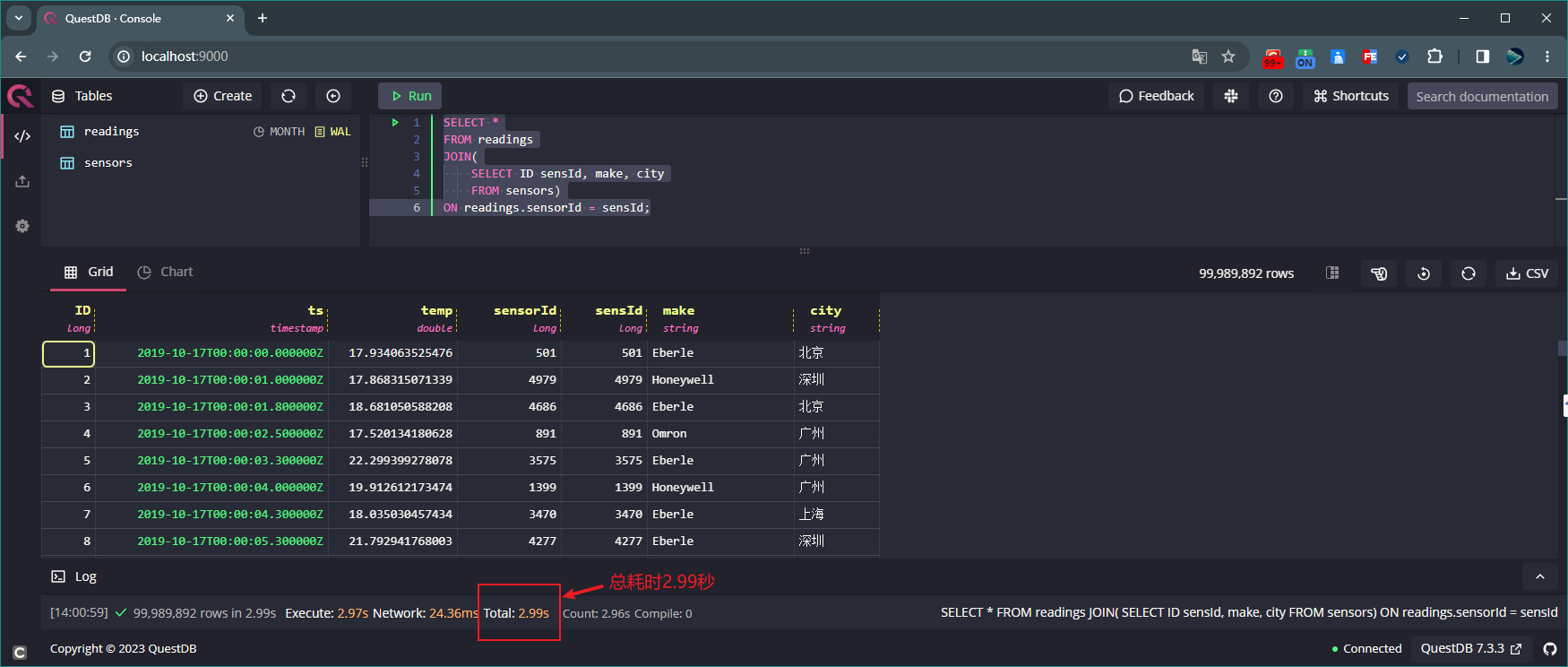
联合查询表sensors和readings的所有数据 上述示例中,表 sensors 中有 1 万条数据,表 readings 中有 1 亿条数据,这两张表联合查询耗时仅仅只用了
2.99秒!!!执行如下命令联合查询表 sensors 和 readings 的 city 字段对应的字段 temp 最大值:
SELECT city, max(temp)
FROM readings
JOIN(
    SELECT ID sensId, city
    FROM sensors) a
ON readings.sensorId = a.sensId AND readings.ts>'2021-01-01' AND readings.ts<'2021-04-01';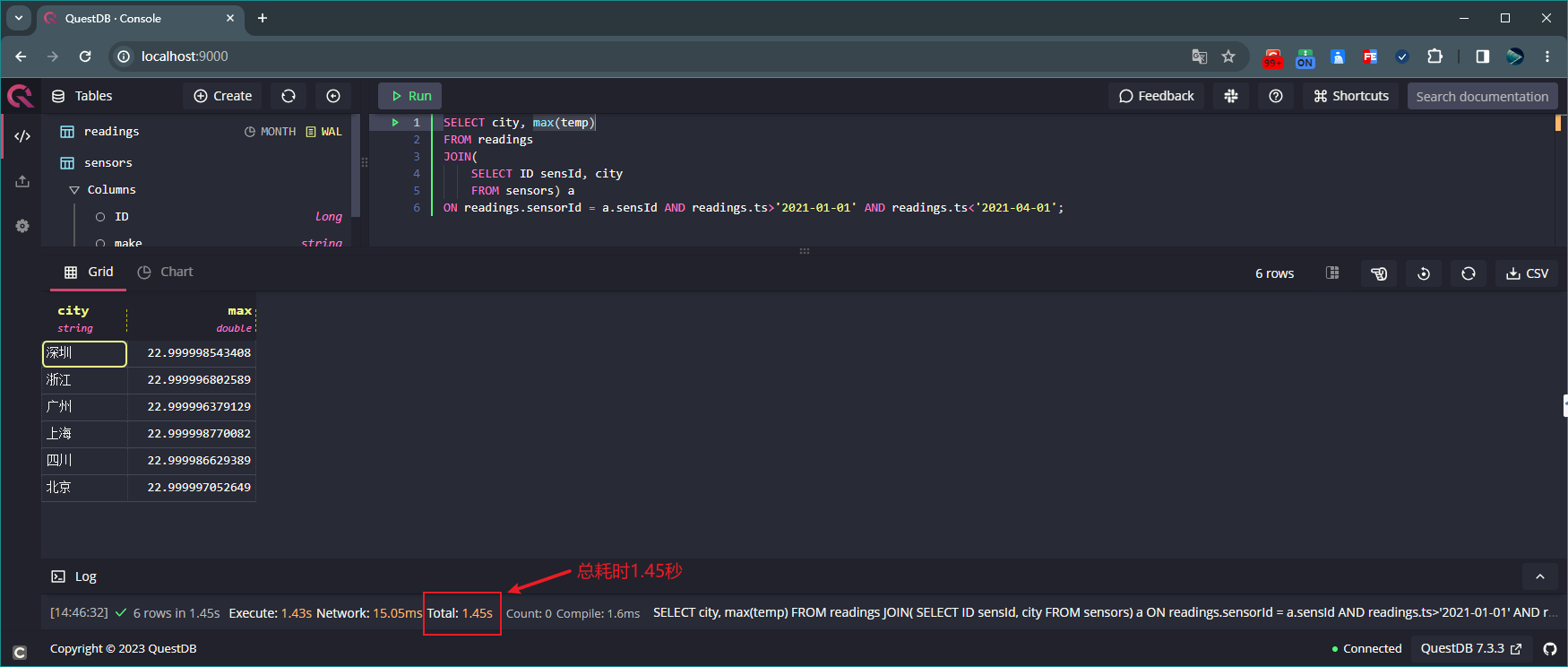
联合查询表sensors和readings的city字段对应的字段temp最大值 执行如下命令联合查询表 sensors 和 readings,并按 ts 字段分组统计:
SELECT ts, city, make, avg(temp)
FROM readings timestamp(ts)
JOIN
    (SELECT ID sensId, city, make
    FROM sensors
    WHERE city='四川' AND make='Omron') a
ON readings.sensorId = a.sensId
WHERE ts IN '2019-10-21;0d' -- 0d表示2019-10-21这一天的数据,如果是1d表示2019-10-21和2019-10-22这2天的数据,以此类推
SAMPLE BY 1h -- 表示按1小时对ts字段进行分组统计
ALIGN TO CALENDAR; -- align the ts with the start of the hour (hh:00:00)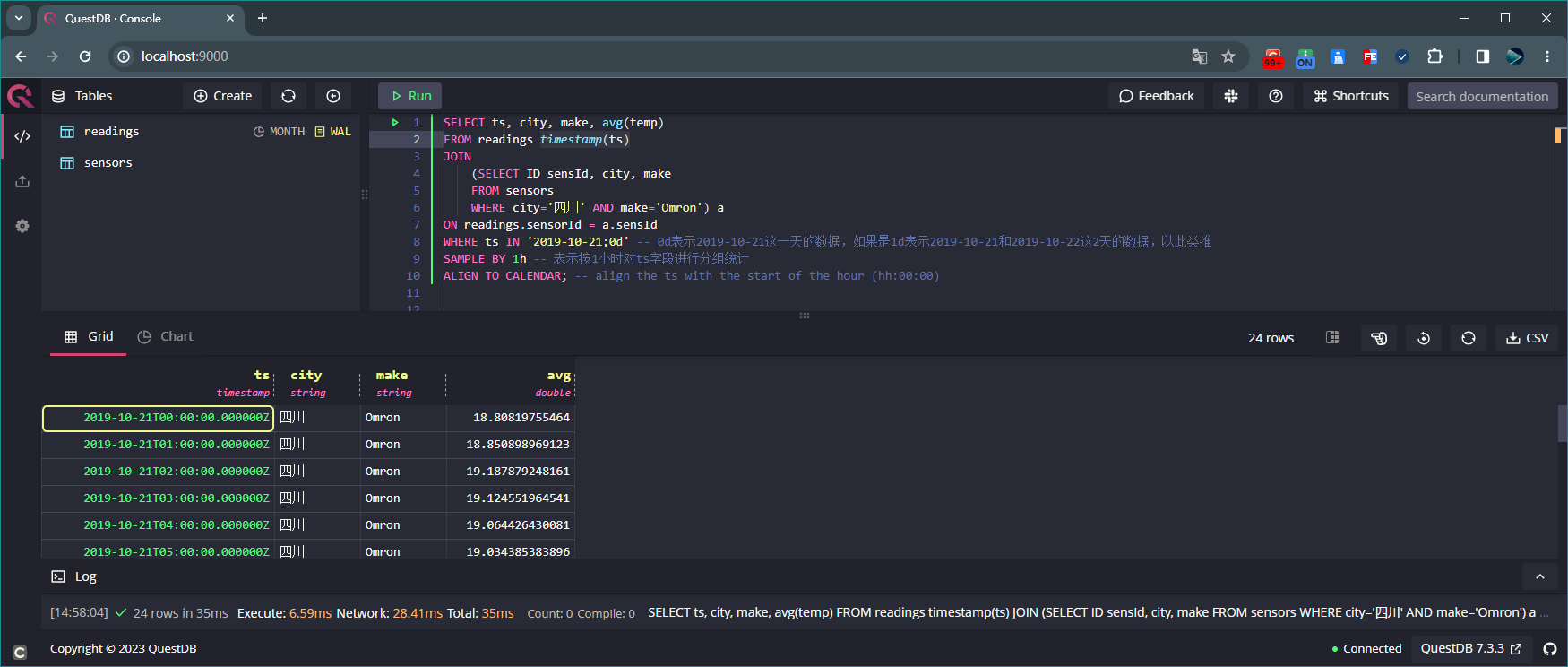
联合查询表sensors和readings,并按ts字段分组统计
5.4、删除
执行如下 SQL 可删除表 sensors 和 readings:
DROP TABLE readings;
DROP TABLE sensors;
注意
使用DROP TABLE命令删除表需谨慎,因为此方式删除后无法恢复数据!!!
SELECT,JOIN,SAMPLE BY 用法
关于 SELECT,JOIN,SAMPLE BY 的具体用法,请参见官网。